One System, Two Operating Modes: How xairouter.com and xaicontrol.com Work Together
Posted March 9, 2026 by XAI Technical Team ‐ 12 min read
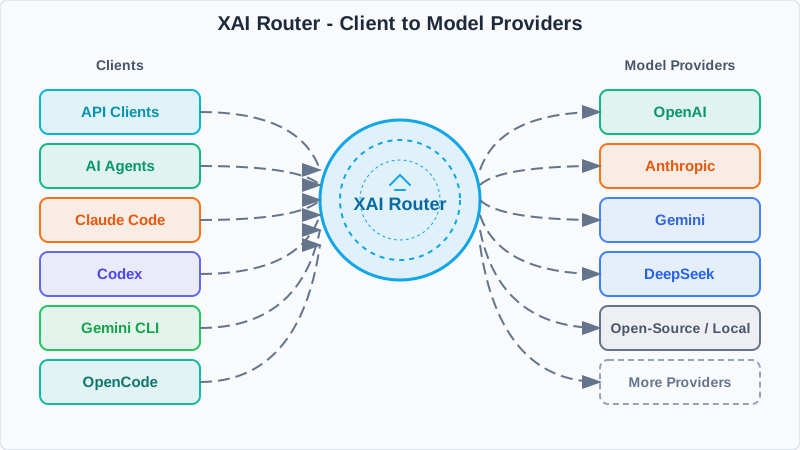
If AI access is infrastructure, then xairouter.com is the ready-to-use unified AI API service, while xaicontrol.com is the control plane that governs and distributes upstream resources. They are related products, but in the combined setup the relationship is more specific than "one handles docs while the other handles BYOK." The better mental model is this: treat xairouter.com as the upstream LLM provider inside xaicontrol.com, then let xaicontrol.com handle sub-account distribution, quotas, allowlists, and audit.
For most teams, the confusing part is not the API itself. It is the relationship between the domains: what exactly do xairouter.com, xaicontrol.com, admin.xaicontrol.com, and manage.xaicontrol.com each do, and how do main accounts and sub-accounts work together? This article makes that structure explicit and gives you the shortest path to a practical setup.
• If you want a unified AI API that works immediately after signup, start with xairouter.com
• If you want to govern your own OpenAI, Anthropic, Gemini, DeepSeek, and other official third-party API keys, and distribute those resources to your team or customers, use xaicontrol.com
• If you want to keep using the AI API resources from xairouter.com while adding sub-account distribution, quotas, and audit, connect xairouter.com into xaicontrol.com as the upstream provider
First, Clarify the Role of Each Site
The easiest way to understand the system is to split it into four layers: product entry, configuration, management, and the runtime API itself.
| Entry | Role | Purpose |
|---|---|---|
xairouter.com | Ready-to-use service / upstream resource entry | A unified AI API Router for developers and teams; it can be used directly, or consumed as the upstream Provider in Pattern A |
xaicontrol.com | BYOK control plane | A multi-tenant AI API Router for teams and enterprises; it handles upstream onboarding, governance, distribution, and audit |
admin.xaicontrol.com / a.xaicontrol.com | Configuration management | The same site; only main accounts can access it. Used to add upstream Provider credentials and define routing rules |
manage.xaicontrol.com / m.xaicontrol.com | User management | The same site; both main accounts and sub-accounts can access it. Used for usage, billing, logs, and sub-account operations |
If you are using the ready-to-use XAI Router mode, the user-facing portal is m.xairouter.com. If you are using the BYOK XAI Control mode, the operational portals are a.xaicontrol.com and m.xaicontrol.com.
Below that UI layer, the actual runtime entry point is still a unified API:
https://api.xairouter.com: the ready-to-use XAI Router modehttps://api.xaicontrol.com: the BYOK XAI Control mode
So from a systems perspective, the visible product surface contains several sites, but the service boundary is still a single AI API Router.
If you use Pattern A, then from the perspective of xaicontrol.com, https://api.xairouter.com is simply another upstream Provider endpoint. The only difference is that this Provider is already a unified AI API service rather than a single vendor API.
The Simplest Mental Model
If you want the most practical way to reason about the product, use this model:
- An account that registers directly on
xaicontrol.comis a main account - The most important property of a main account is that it can sign in to Admin
- The main account connects an upstream Provider in
Admin; that upstream can be an official provider such as OpenAI or Anthropic, or a unified AI API service such asxairouter.com - The main account creates sub-accounts in
Manage, then allocates credits, limits, and access scopes - Sub-accounts typically sign in only to
Manage; they do not need and usually do not have access toAdmin - Applications and team members call the unified Base URL rather than using upstream credentials directly against upstream APIs
In practice, this separates raw upstream resources from actual consumption rights:
Upstream provider credentials (official provider or xairouter)
            ↓
Main account adds and configures them in Admin
            ↓
Main account creates sub-accounts and distributes quotas/permissions in Manage
            ↓
Sub-accounts receive their own XAI API keys
            ↓
Apps, team members, and projects call api.xaicontrol.com uniformly
That is the real value of xaicontrol.com: whether your upstream credentials come from an official provider or from xairouter.com, they stop being scattered secrets and become a governed, distributable, auditable internal AI resource system.
The Same System Seen from the API Layer
If you care more about the service boundaries than the pages, the system breaks down naturally into three kinds of APIs.
1. Admin API: Resources and Rules
When a main account signs in to Admin, it is effectively using the Owner-side control APIs:
/x-keys: manage upstream Provider keys/x-conf: view and batch-update main-account-level configuration/x-config: CRUD configuration entries/x-info: inspect detailed information for a user
These APIs cover things like:
- adding official third-party keys from OpenAI, Anthropic, Gemini, DeepSeek, and others, or connecting an upstream unified AI API service such as
xairouter.com - configuring
LevelMapper,ModelMapper,Resources, andModelLimits - defining model pools, primary/backup routing, whitelists, and pricing rules
2. Manage API: Accounts, Quotas, and Distribution
Manage is the operational side:
/x-users: create, update, and delete sub-accounts/x-dna: inspect the descendant account tree/x-bill: view descendant billing/dashboard/*: status, billing, logs, news, and model visibility/x-self: rotate the current account API key
This layer does not decide how a model is routed internally. It decides who can use what, how much they can use, and what they are allowed to see.
3. Proxy API: The Runtime Model Service
What your application actually calls is the unified inference layer:
/v1/chat/completions/v1/responses/v1/messages/v1/models
This is why the system feels operationally heavy but integration-light: your application usually only changes the Base URL and API key, not the calling pattern itself.
Pattern A: Connect xairouter.com into xaicontrol.com as the Upstream Provider
This is the most natural setup for teams, channel businesses, and SaaS platforms that already want to use xairouter.com but still need organization-level governance and downstream distribution.
This is better understood not as "two modes side by side" but as an "upstream service + downstream governance/distribution" setup.
xairouter.comprovides ready-to-call unified AI API resources and acts as the upstream LLM service providerxaicontrol.comconnects that upstream service into its own Router layer, then adds main/sub-account distribution, quotas, model allowlists, logging, and audit
From the perspective of xaicontrol.com, xairouter.com behaves like any other upstream Provider entry. The difference is that xairouter.com has already normalized the protocol surface and model routing for you.
The easiest way to understand it is to look at the request path:
Applications / team members / customers
                ↓
api.xaicontrol.com
                ↓
Upstream Provider: api.xairouter.com + XAI Router API key
                ↓
XAI Router routes to the actual model services
In other words, xairouter.com is not just a documentation or onboarding site in this pattern. It is the upstream LLM service that xaicontrol.com consumes, while xaicontrol.com adds the organizational governance and downstream distribution layer on top.
This combination is especially effective for teams that:
- are already using or planning to use the unified AI API from
xairouter.com, but still need a main/sub-account structure - do not want to hand the primary
xairouter.comAPI key directly to team members or customers - need quotas, model allowlists, IP/resource restrictions, and billing audit on top of the same upstream resource
- want downstream systems to use
api.xaicontrol.comuniformly whilexairouter.comremains the upstream service
A common rollout looks like this:
- Prepare an existing XAI Router account or obtain an XAI Router API key from
xairouter.com - The owner or operator opens a main account on
xaicontrol.com - In
Admin, they addhttps://api.xairouter.comas the upstreamProviderand use the XAI Router API key asSecretKey - They define
LevelMapper,ModelMapper,Resources, and other governance rules - They create sub-accounts for team members, projects, or customers in
Manage - Downstream users and systems call
api.xaicontrol.com, andxaicontrol.comforwards requests to upstreamxairouter.com
The advantage is straightforward: xairouter.com keeps supplying the LLM service, while xaicontrol.com turns that supply into a governed, distributable, rate-limited, and auditable resource layer of your own.
Pattern B: Use Only xaicontrol.com
If your goal is already clear, namely, "I want to bring my own upstream Provider credentials under governance and distribute them to my team or customers," then you can skip the detour and start directly with xaicontrol.com.
This is the purest and most powerful use of the product.
You can think of it as an operating system for BYOK AI resources:
- the resource source is your own official third-party keys
- routing, whitelists, rate limits, metering, billing, and logs are handled uniformly by the platform
- downstream users and systems do not touch the raw Provider keys; they receive only their own XAI API keys
In this pattern, the upstream resources are usually your own official OpenAI, Anthropic, Gemini, or DeepSeek keys rather than xairouter.com.
Under this model, the responsibilities of main accounts and sub-accounts are cleanly separated:
- the main account adds upstream keys, defines strategy, and owns the resource pools
- sub-accounts consume only what has been explicitly authorized
- the main account keeps using
Managefor quota changes, account lifecycle management, access tightening, and usage review
This is often the best direct path for:
- internal enterprise AI platform owners
- SaaS teams that need to distribute AI quotas to customers
- engineering teams that want to standardize several providers behind one internal interface
- developers who need project-level, department-level, or environment-level AI resource isolation
Get xaicontrol.com Running in Five Minutes
Here is the shortest practical path for getting XAI Control into real use.
Step 1: Register a Main Account
Go to xaicontrol.com and register. Any account created there directly can be treated as a main account.
Once registration is complete, you receive your own XAI API key and gain access to both Admin and Manage.
Step 2: Sign in to Admin and Connect an Upstream Provider
Use either:
https://admin.xaicontrol.com- or
https://a.xaicontrol.com
These are the same site.
This is where you connect your upstream resources, for example:
- OpenAI
- Anthropic
- Gemini
- DeepSeek
xairouter.com(if you are using Pattern A)- other compatible providers
If you are using Pattern A, this is where you enter https://api.xairouter.com plus the corresponding XAI Router API key. If you are using Pattern B, this is where you enter the credentials for the official upstream providers you own.
Once connected, those upstream resources become part of your own private resource pools.
Step 3: Configure Routing and Governance Rules
Still in Admin, define the main-account-level rules, such as:
LevelMapper: which model family should route to which poolModelMapper: how requested model names map to actual execution modelsResources: which API paths are allowedModelLimits: limits for expensive models
Conceptually, this is where upstream credentials are turned into governed services.
Step 4: Sign in to Manage and Create Sub-Accounts
Use either:
https://manage.xaicontrol.com- or
https://m.xaicontrol.com
These are also the same site.
In Manage, you can:
- create sub-accounts
- allocate credits or quotas
- define model, IP, and resource whitelists
- adjust rate limits and billing rules
- inspect logs, usage, and descendant billing
At this point, most teams already have what they need to distribute AI resources along organizational lines.
Step 5: Distribute Unified API Keys to Members or Systems
This is the most important operational point:
what you distribute is not the raw upstream credential, but an account-level XAI key issued by the system.
That means:
- whether the upstream is an official provider or
xairouter.com, the real upstream credential never leaves the main-account governance boundary - downstream users receive only controlled credentials
- quotas, permissions, model scope, and logs remain independently observable
Step 6: Point Your Application at the Unified Base URL
Once the resources and accounts are ready, your application just calls the unified endpoint:
export XAI_API_KEY="sk-xxxx"

curl https://api.xaicontrol.com/v1/chat/completions \
  -H "Authorization: Bearer $XAI_API_KEY" \
  -H "Content-Type: application/json" \
  -d '{
    "model": "gpt-5.3-codex",
    "messages": [
      {
        "role": "user",
        "content": "Hello, please introduce yourself."
      }
    ]
  }'
If you already use an OpenAI-compatible client, the migration cost is usually just one change: replace the Base URL and the API key.
For example, in JavaScript:
import OpenAI from "openai";

const client = new OpenAI({
  apiKey: process.env.XAI_API_KEY,
  baseURL: "https://api.xaicontrol.com/v1",
});

const resp = await client.chat.completions.create({
  model: "gpt-5.3-codex",
  messages: [{ role: "user", content: "hello" }],
});
If you are not going through xaicontrol.com and instead use the ready-to-use XAI Router mode directly, the code shape stays the same and only the Base URL changes to https://api.xairouter.com/v1.
Why This Works Better for Teams
What many teams actually lack is not another model endpoint. It is a stable way to turn upstream AI access into something the organization can govern.
Whether the upstream is an official provider or a unified AI API service like xairouter.com, that is exactly where xaicontrol.com matters:
- No upstream credential sprawl: whether the upstream credential comes from an official provider or from
xairouter.com, it stays within the main-account governance boundary - Permissions inherit but stay bounded: sub-accounts can only operate within what the parent account permits
- Costs stay controllable: credits, limits, model access, and billing can be segmented per account
- Auditing becomes readable: you can trace who consumed what and when
- Application integration stays uniform: developers target one API while management policies evolve independently
For individual developers, this means no more jumping across several provider dashboards just to keep AI access under control.
For team leads, it means AI resources can finally be managed the way cloud hosts, databases, and object storage are managed.
For SaaS and channel businesses, it means AI capability can become a real distributable, billable, and operable service rather than a pile of credentials.
Final Recommendation
If you are still validating a product idea and want the fastest path to a unified AI API, using xairouter.com directly is the easiest starting point.
If you already know you want to govern upstream resources you own and distribute them safely, start directly with xaicontrol.com.
And if your target state is "keep using the AI API resources from xairouter.com, while handling downstream distribution, limits, permissions, and audit inside my own account hierarchy," then the natural setup is to connect xairouter.com into xaicontrol.com as the upstream LLM provider.
That does not make the system more complicated. It takes complexity that already exists and compresses it into a structure that is clearer, more stable, and easier to scale.