XAI Router + RTK: Cut 60%-90% of Shell-Heavy Tokens in Claude Code and Codex
Posted March 31, 2026 by XAI Technical Team ‐ 7 min read
XAI Router stays the shared model-access layer, while RTK compresses noisy local CLI output before it bloats Claude Code or Codex transcripts.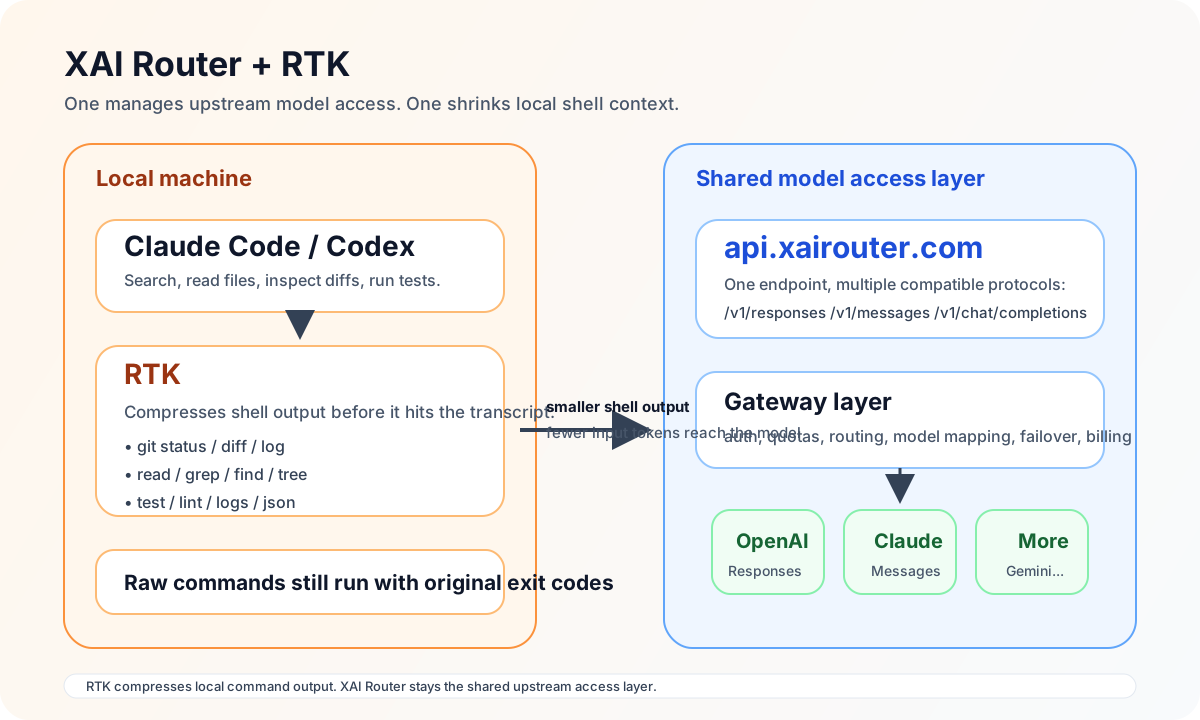
If you already run Claude Code, Codex, OpenCode, or similar coding-agent workflows through https://api.xairouter.com, the next upgrade is often not "pick a different model." It is RTK.
RTK sits in front of shell output and makes that output smaller before it becomes part of the agent session. It does not replace your gateway. It does not replace your tools. It reduces the amount of noisy terminal text coming from commands like git diff, cargo test, rg, docker logs, and cat.
For teams already using XAI Router, the fit is natural because the two layers solve different problems:
- XAI Router handles unified model access, auth, routing, quotas, failover, billing, and compatibility across OpenAI, Anthropic, Realtime, and more.
- RTK handles local CLI context compression, so the coding agent stops feeding raw terminal noise into the model.
api.xairouter.com is smaller too, which usually means lower input-token usage and better effective context retention.Why XAI Router and RTK Work Well Together
A typical Go relay/router service is already more than a thin OpenAI proxy. In practice, systems like this usually support a broader compatibility and control layer:
- OpenAI Chat Completions, OpenAI Responses, Anthropic Messages, and Realtime/WebSocket style entry points
- provider and path mapping by model family
- quota, rate-limit, and usage tracking in the proxy layer
- sticky scheduling, failover, and multi-upstream routing
That means api.xairouter.com solves the remote model-access problem, while RTK solves the local terminal-context problem.
In practice, the flow looks like this:
Claude Code / Codex
  -> runs git / grep / test / logs locally
  -> that output becomes part of the agent transcript
  -> the transcript is then sent through api.xairouter.com to the model
Without RTK, a lot of raw terminal text that has little decision value still lands inside the model input. With RTK, the transcript contains a compressed version instead.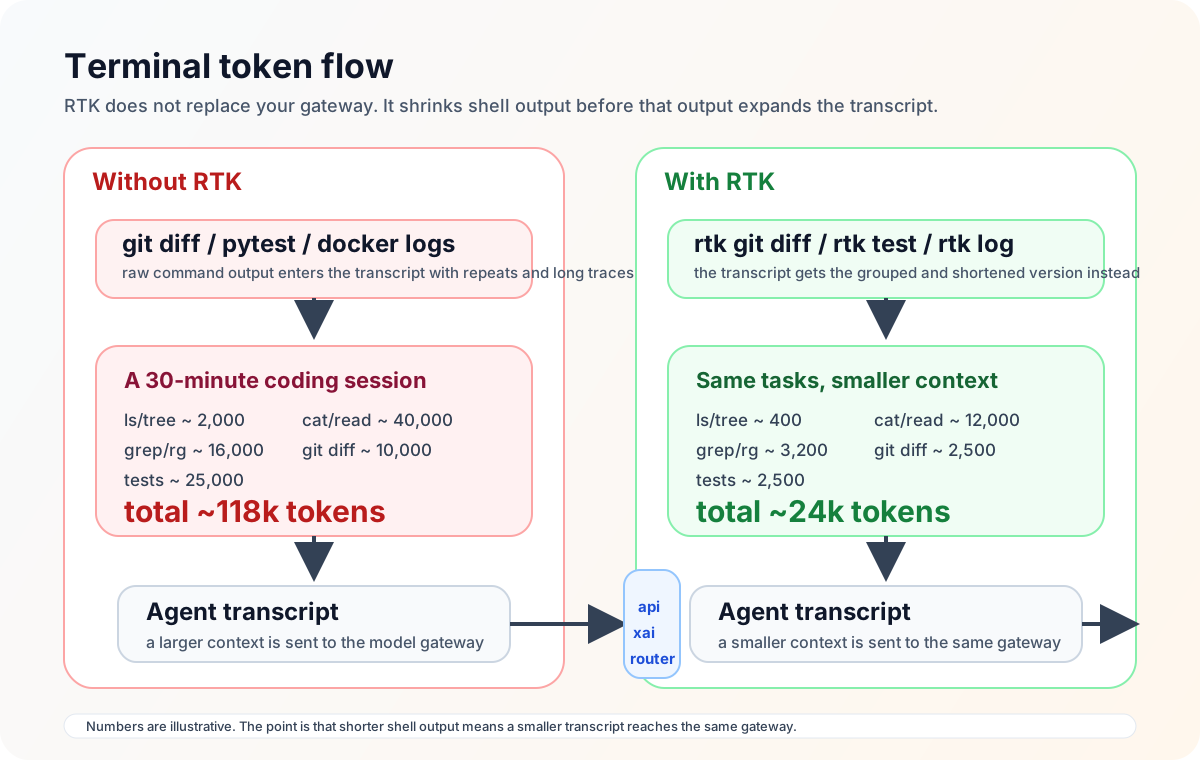
What RTK Actually Saves
RTK's published examples show 60%-90% savings in shell-heavy coding sessions. The commands with the highest practical impact are usually:
| Workflow | What goes wrong without RTK | What RTK typically does |
|---|---|---|
git status / git diff | long file lists and oversized diff context | extracts change summaries and keeps only key signal |
cat / read | full files enter context, including comments and boilerplate | applies language-aware filtering and truncation |
grep / rg | repeated paths and scattered match lines | groups by file and trims long lines |
pytest / cargo test / cargo nextest | too many success logs | keeps failures, warnings, and useful summaries |
docker logs | repeated log lines flood the transcript | deduplicates and counts repeated messages |
Below are two common repo patterns:
1. relay-gateway
This is a sizeable Rust relay/router codebase. RTK is especially useful for:
- tracing request paths:
rtk grep "responses|messages|realtime" src/ config/ - reading large files:
rtk read src/proxy.rs -l minimal --max-lines 220 - inspecting route/config rules:
rtk grep "PathMappers|ProviderMappers" config/ - running tests:
rtk test cargo test - reviewing changes:
rtk git diff
2. docs-studio
This content-heavy docs site is a strong RTK fit for:
- auditing integration examples:
rtk grep "api.xairouter.com" content/blog content/docs - scanning long articles quickly:
rtk read content/blog/xxx.md -l minimal - locating model/path references across markdown files:
rtk find "*.md" content/blog - reviewing editorial changes:
rtk git diff
Connect XAI Router First, Then Add RTK
It is useful to keep the two layers separate in your rollout plan.
Step 1: make sure your model endpoint is already api.xairouter.com
If you have not finished the base setup yet, your site already has the relevant starting points:
Step 2: add RTK locally
Install RTK with whichever path fits your machine:
# Homebrew
brew install rtk

# quick install
curl -fsSL https://raw.githubusercontent.com/rtk-ai/rtk/refs/heads/master/install.sh | sh

# Cargo
cargo install --git https://github.com/rtk-ai/rtk
Then do a quick sanity check:
rtk --version
rtk gain
rtk gain may show little or no history at first. That is normal. It becomes useful once you start routing real shell-heavy work through RTK.
Claude Code + XAI Router + RTK: The Highest-Leverage Setup
If your Claude Code environment already looks like this:
export ANTHROPIC_BASE_URL="https://api.xairouter.com"
export ANTHROPIC_AUTH_TOKEN="your XAI API key"
then the recommended RTK step is:
rtk init -gThat installs a real Bash hook for Claude Code. In practice, when Claude wants to run commands like git status, git diff, pytest, or rg, RTK can transparently rewrite those into compact RTK equivalents.
This is why Claude Code currently gets the smoothest RTK experience.
Minimal working flow
# 1) keep Claude Code pointed at XAI Router
export ANTHROPIC_BASE_URL="https://api.xairouter.com"
export ANTHROPIC_AUTH_TOKEN="your XAI API key"

# 2) install RTK hook
rtk init -g

# 3) restart Claude Code
claude
Once inside a session, you usually do not need to over-explain RTK. Just give Claude shell-heavy work, for example:
Please inspect the current uncommitted changes, summarize the risks by file, and tell me which tests are worth running first.Claude will often reach for git status, git diff, rg, and test commands, which is exactly where RTK is most valuable.
One important limitation
RTK's transparent rewrite for Claude Code primarily applies to Bash tool calls.
That means:
git status,git diff,cargo test,rg, and other shell commands are the best fit- Claude Code built-in tools like
Read,Grep, andGlobdo not automatically pass through the RTK Bash hook
So if you want the biggest benefit in large repos, steer Claude toward shell-oriented workflows, for example:
Prefer shell commands for repository analysis. Use rtk read / cat / rg where practical instead of relying heavily on built-in Read/Grep.Codex + XAI Router + RTK: Best for Explicit Tooling Rules
If your Codex config already looks like this:
model_provider = "xai"
model = "gpt-5.4"
approval_policy = "never"
sandbox_mode = "danger-full-access"

[model_providers.xai]
name = "xai"
base_url = "https://api.xairouter.com"
wire_api = "responses"
requires_openai_auth = false
env_key = "XAI_API_KEY"
and:
export XAI_API_KEY="your XAI API key"then the recommended RTK setup is:
rtk init -g --codexHere the key difference from Claude Code matters:
- Claude Code gets a true shell hook with transparent rewrites
- Codex currently gets prompt-level integration via
AGENTS.md + RTK.md, not a transparent command hook
So RTK is still useful in Codex, but the best workflow is slightly different:
- run
rtk init -g --codexto configure global~/.codex/AGENTS.mdandRTK.md - add a stronger project-level preference in your repository
AGENTS.md - explicitly ask Codex to prefer RTK commands in shell-heavy tasks
Recommended AGENTS.md snippet
Prefer RTK for shell-heavy repository work.

- Use `rtk git status`, `rtk git diff`, `rtk git log` for VCS inspection.
- Use `rtk read`, `rtk grep`, `rtk find` for codebase search.
- Use `rtk test`, `rtk pytest`, `rtk cargo test`, `rtk log` when available.
- Fall back to raw commands only when exact full output is required.
Task phrasing that works well in Codex
Please prefer RTK commands for this repo audit:
1. Use rtk git status and rtk git diff to inspect changes.
2. Use rtk grep to locate api.xairouter.com references in docs.
3. Use rtk read for large files.
4. Then summarize risks and recommendations in English.
When the rules are explicit and the tool names are concrete, Codex is much more likely to consistently benefit from RTK.
Six RTK Commands That Are Immediately Useful Across Two Common Repo Types
The examples below use two sample repository names: relay-gateway and docs-studio.
1. Review changes without feeding the full raw diff into the model
cd ~/work/relay-gateway
rtk git status
rtk git diff
Best for routine review and tracing changes in handler/, conf/, and docs.
2. Read long Rust files in a compressed form first
rtk read src/proxy.rs -l minimal --max-lines 220Best for getting module structure and major branches before reading the raw file.
3. Audit integration examples across the docs site
cd ~/work/docs-studio
rtk grep "api.xairouter.com" content/blog content/docs
Best for checking base_url, /v1/responses, /v1/messages, and environment-variable consistency.
4. Keep test runs failure-focused
cd ~/work/relay-gateway
rtk test cargo test
Best for medium or large Rust projects with noisy test output.
5. Deduplicate large logs before they hit the transcript
rtk log app.logBest for repeated 429, timeout, retry, and upstream error patterns.
6. Measure what you are saving
rtk gain
rtk gain --graph
Those two commands are worth making part of the routine. One shows cumulative savings. The other shows trend shape over time.
When Not to Force RTK
RTK is excellent for coding-agent sessions with a lot of shell work, but not every command should be compressed by default.
You often want raw output when:
- you need exact full JSON or protocol payloads
- you are in deep one-off debugging and must inspect all logs
- you need to preserve exact output formatting for manual copy/paste
The practical rule is simple: RTK should be the default for noisy shell work, not a hard requirement for every command.
The Fastest Rollout Path
If you want visible results today, the shortest paths are:
Claude Code users
export ANTHROPIC_BASE_URL="https://api.xairouter.com"
export ANTHROPIC_AUTH_TOKEN="your XAI API key"
brew install rtk
rtk init -g
claude
Codex users
export XAI_API_KEY="your XAI API key"
brew install rtk
rtk init -g --codex
codex
Then start with these four categories:
git status/git diffread/cat/greptestlog
For teams already relying on api.xairouter.com for routing, auth, quotas, model mapping, and failover, RTK is not "another layer of complexity." It is the missing local layer that stops low-value terminal output from bloating the transcript before that transcript ever reaches the model.
One-line summary:
XAI Router gets the request to the right model reliably. RTK keeps unnecessary terminal text from reaching that model in the first place.